
TL;DR
Restricting cache access to trusted browser processes and explicit exceptions stops unauthorized recovery. Clipboard controls can interrupt the ClickFix handoff, while monitoring non-browser cache reads provides additional coverage.
In 2023, Aurélien Chalot published Browsers’ cache smuggling, demonstrating how a browser cache could be used to deliver a DLL on Windows. Accessing a website caused the browser to cache attacker-controlled content, which a socially-engineered PowerShell command subsequently located and recovered.
A 2025 follow-up returned to the technique and expanded on defensive guidance, including restricting scripting engines, clearing browser caches on exit, and monitoring non-browser access to cache files.
The technique itself is not a browser vulnerability. Browsers are supposed to persist cacheable content locally, reducing repeat downloads and improving the user experience. The interesting boundary appears later: can another process running as the user enumerate those files, identify controlled content, and turn it back into a standalone file?
On macOS, the answer depends on the browser and the recovering process’s access. ClickFix supplies the social-engineering step: convincing the user to run a command that retrieves the staged content.
From web response to local file
Browser cache smuggling solves the staging problem, not execution. The browser fetches and stores attacker-controlled bytes as ordinary cached content. Entries use hashed names and browser-specific layouts, and caching the bytes does not execute them.
A ClickFix command (or similar local action) is still needed to locate the cached object or known marker, parse or carve the response body, and pass the recovered content to whatever execution mechanism follows.
- 01 / host Attacker hosts website Serves a cacheable response containing a known marker
- 02 / visit Browser visits website Makes a normal HTTPS request to the page
- 03 / cache Response is cached Stored under a hashed name with browser metadata
- 04 / execute Execute ClickFix command The user runs pasted shell content
- 05 / locate Find the known marker The command enumerates cache objects
- 06 / recover Recover staged content Recovered bytes are written to disk or interpreted directly
While only one part of the overall attack chain, the technique offers some offensive advantages:
- Browser-native delivery: The browser makes the network request, rather than
curlor another obvious downloader. - No payload URL in the command: The pasted command does not need to contain a payload URL, which could be blocked by XProtect.
- Payload obfuscation: Hashed cache filenames remove the original filename and extension. File signatures can remain visible, but an attacker can separately encode the payload for the recovery command to decode.
- A less direct detection chain: The browser writes to its cache rather than
Downloads, separating the network request from the process that later recovers and executes the content.
Of course, this doesn’t make the technique invisible. It just changes where defenders need to look.
Browser caches on macOS
The ordinary HTTP disk caches used for browsing content are separate from browser profile databases and credential stores:
| Browser | HTTP disk cache |
|---|---|
| Google Chrome | ~/Library/Caches/Google/Chrome/<profile>/Cache/Cache_Data |
| Microsoft Edge | ~/Library/Caches/Microsoft Edge/<profile>/Cache/Cache_Data |
| Brave | ~/Library/Caches/BraveSoftware/Brave-Browser/<profile>/Cache/Cache_Data |
| Chromium | ~/Library/Caches/Chromium/<profile>/Cache/Cache_Data |
| Firefox | ~/Library/Caches/Firefox/Profiles/<profile>/cache2/entries |
| Safari | ~/Library/Containers/com.apple.Safari/Data/Library/Caches/com.apple.Safari/WebKitCache |
Paths can change across browser versions and profiles. Chromium browsers also maintain separate code caches and Service Worker storage, but the ordinary HTTP cache is the relevant location for the technique tested here.
The on-disk representation differs between browser engines. Chromium browsers use the Simple Cache backend, storing hashed entry files that combine the cache key, response body and HTTP metadata. Firefox also uses hashed files, with each unencrypted cache2 entry containing response data followed by metadata, as described in Mozilla’s HTTP Cache source documentation. Mozilla also documents optional disk-cache encryption (neat!), which is disabled by default in the current source. Encrypted entries cannot be recovered by simply carving plaintext bytes.
Safari’s WebKit cache separates versioned records and larger response blobs, uses salted hashes and integrity validation, and stores the cache inside Safari’s app container.
Hashed names and cache metadata are not encryption and do not reliably hide file signatures. In unencrypted Firefox entries, response data begins at offset zero. WebKit stores small bodies inline after cache metadata, while larger bodies are written byte-for-byte as separate blobs, as shown in its cache storage implementation. Those blobs retain the response’s file signature.
We validated Safari’s location with a controlled request on Safari 27.2. A cacheable PNG containing a unique marker was written byte-for-byte to:
~/Library/Containers/com.apple.Safari/Data/Library/Caches/com.apple.Safari/
  WebKitCache/Version 17/Records/<partition>/Resource/<hash>-blob
  WebKitCache/Version 17/Blobs/<hash>
Safari’s protected app container blocks Terminal from enumerating or reading this cache by default. Granting Terminal Full Disk Access (FDA) permits recovery. This is a boundary around Safari’s cache, not a platform-wide mitigation: ordinary Chrome and Firefox cache paths do not require FDA for same-user access.
Reproducing the technique
Recovering a Chromium response body
Chromium’s Simple Cache format is documented in simple_entry_format.h. A normal _0 entry is arranged as:
SimpleFileHeader
cache key
stream 1 response body
stream 1 footer
stream 0 HTTP metadata
optional SHA-256 of the cache key
final footer
This makes the response body recoverable without a browser API. The extraction command reads the key length from the 24-byte header, then works backward from the final 24-byte footer. That footer supplies the stream 0 metadata size and indicates whether a 32-byte key hash is present. Stepping over those fields and the preceding stream 1 footer reveals the exact start and length of the original response body.
The entry filename itself is derived from the cache key (you’ll see filenames like 82cafd9ad3c026a7_0). On macOS, these files are restricted to the owning user, but those permissions do not distinguish Chrome from another unsandboxed process running as that same user.
Try it against this post
The image below is a benign demonstration of browser cache smuggling. It’s a valid PNG containing the benign string below between two AABBCCDDEEFF markers in a PNG metadata chunk:
Phorion browser cache smuggling demo recovered successfully.
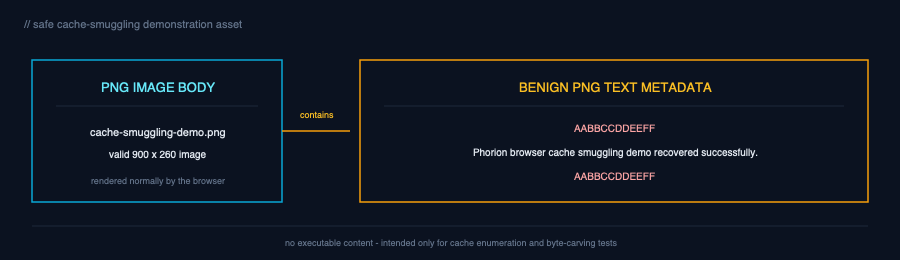
After loading this page in a normal Chrome window with the default profile and disk caching enabled, the following one-liner finds the image’s cache entry, parses Chromium’s Simple Cache boundaries, and writes the complete PNG response body to a file under /tmp. It checks the cache key, rather than accepting a filename mentioned in another response.
d="$HOME/Library/Caches/Google/Chrome/Default/Cache/Cache_Data"; n='cache-smuggling-demo.png'; u32(){ od -An -tu4 -N4 -j"$2" "$1" | tr -d ' '; }; f=$(find "$d" -maxdepth 1 -type f -name '*_0' -exec grep -aFl "$n" {} + | while IFS= read -r x; do kl=$(u32 "$x" 12); [ "$kl" -gt 0 ] && [ "$kl" -le 65536 ] || continue; dd if="$x" bs=1 skip=24 count="$kl" status=none | grep -Fq "$n" && { printf '%s\n' "$x"; break; }; done); [ -n "$f" ] || { echo 'cache entry not found' >&2; exit 1; }; sz=$(stat -f%z "$f"); kl=$(u32 "$f" 12); fo=$((sz-24)); flags=$(u32 "$f" $((fo+8))); s0=$(u32 "$f" $((fo+16))); sha=$((flags&2?32:0)); end=$((fo-sha-s0-24)); start=$((24+kl)); count=$((end-start)); [ "$count" -gt 0 ] && [ "$count" -le $((10*1024*1024)) ] || { echo 'invalid body range' >&2; exit 1; }; out=$(mktemp /tmp/cache-smuggling-image.XXXXXX) || exit 1; dd if="$f" of="$out" bs=1 skip="$start" count="$count" status=none && printf 'output=%s size=%d\n' "$out" "$count" && file "$out"A known marker allows recovery of just the embedded content without parsing the cache format.
The one-liner below enumerates cache objects, locates two marker instances, and prints only the enclosed content (the marker is split in the command so caching this blog doesn’t match itself!):
d="$HOME/Library/Caches/Google/Chrome/Default/Cache/Cache_Data"; m='AABB''CCDDEEFF'; f=$(find "$d" -maxdepth 1 -type f -exec grep -aFl "$m" {} + | while IFS= read -r x; do [ "$(LC_ALL=C grep -aobF "$m" "$x" | sed -n '2p')" ] && { printf '%s\n' "$x"; break; }; done); [ -n "$f" ] || { echo 'marker pair not found' >&2; exit 1; }; set -- $(LC_ALL=C grep -aobF "$m" "$f" | sed -n '1,2{s/:.*//p;}'); start=$(($1+${#m})); count=$(($2-start)); [ "$count" -ge 0 ] && [ "$count" -le 4096 ] || { echo 'invalid marker range' >&2; exit 1; }; dd if="$f" bs=1 skip="$start" count="$count" status=none && printf '\n'What macOS prevents - and what it doesn’t
Native controls act at different stages: permissions and Transparency, Consent and Control (TCC) govern access, while Gatekeeper and code-signing enforcement concern what happens after recovery.
| Control | What it helps with | What it does not prevent |
|---|---|---|
| POSIX permissions | Chrome’s 0700 cache directory and 0600 files prevent access from other user accounts. | Another unsandboxed process running under the same user ID can still read the files. |
| TCC + Full Disk Access | Limits access to protected privacy categories; removing unnecessary Terminal FDA reduces broader exposure. | It does not add a TCC gate to ordinary Chrome and Firefox caches. A non-sandboxed process running as the same user can generally read them without FDA. |
| Safari app-container | Adds an app identity and authorization boundary around Safari’s container, blocking Terminal cache access by default. | Full Disk Access authorizes Terminal to read the cached responses. The boundary controls access; it does not encrypt the content. |
| Quarantine + Gatekeeper | Quarantine identifies downloaded content for Gatekeeper’s trust checks when opened through an assessed launch path. | Writing cached bytes to a new file with dd does not copy com.apple.quarantine. Provenance alone is not an execution block, and Gatekeeper is not a universal script-control mechanism. |
| Code signing | Enforces platform requirements for native executables, including code-signature validation where required. | Trusted interpreters can consume recovered scripts, and a valid signature does not mean code is benign. |
| Cache integrity checks | Chromium CRCs, Firefox hashes and WebKit salted validation detect corruption when the browser reads an entry. | They do not prevent another process reading a valid entry and copying its response body elsewhere. |
In practice, Chrome and Safari cache objects in our reproductions carried com.apple.quarantine, but a new file carved with dd did not inherit it. A benign, ad-hoc-signed Mach-O recovered from Chrome’s cache ran through direct Terminal execution after its execute permission was set, despite carrying com.apple.provenance. Of course, this doesn’t guarantee that every recovered payload will run or evade other controls.
Preventing cache recovery
A file-access protection can provide the process-level boundary that general filesystem permissions lack. It protects browser cache paths and checks the requesting process before allowing a file open. Trusted browser and helper processes retain access; shells, interpreters and unrelated applications are denied the reads needed to recover response content.
The allow rules should validate the complete process identity: a trusted code signature, the expected signing ID and, for third-party browsers, the expected Team ID. Legitimate security, management or support tooling can be added as explicit exclusions after observing normal access in audit mode.
Phorion Protections provides this cache protection today for Chrome, Firefox, Safari, Edge, Brave, Arc and Opera.
Stop the ClickFix
Clipboard and process-execution controls complement cache restrictions by stopping the local recovery command.
In macOS Tahoe 26.4, Apple added a warning for browser-to-Terminal pastes under specific user-activity conditions, alongside checks for known-bad domains in pasted content. A cache-only recovery command need not contain a domain, so domain checks alone do not cover this technique.
Phorion Clipboard Protection supports auditing, user prompts and policy-driven blocking of browser-to-terminal pastes, without relying solely on domains in the command.
For appropriate user groups, Phorion Protections also allows for unsigned executables and script interpreters to be blocked completely.
Detection opportunities
Prevention should be the first choice, but cache access also provides useful telemetry.
Look for non-browser processes opening many files under Cache_Data, cache2/entries or Safari’s WebKitCache, particularly shells and interpreters. Correlate those reads with file creation, execute-permission changes and subsequent execution. Broad enumeration is useful evidence, not a prerequisite: a command that knows the entry’s location can read it directly. Baseline legitimate backup and security tooling before adding exclusions.
Our demo commands used find, grep and dd, but detections should not depend exclusively on those commands. The same operation could be performed with native file APIs or other native command-line tools.
Conclusion
Browser cache smuggling brings browser-native payload staging to macOS. By default, Chrome and Firefox cache content is recoverable by other unsandboxed processes running as the same user, without browser APIs or another network request. Safari’s protected app container adds an access boundary absent from those cache paths; granting Full Disk Access to the recovery application removes that barrier.
Staging is not execution: a ClickFix command or another local action must still recover and run the content. But writing cached bytes into a new file with dd does not copy the source’s quarantine attribute, and provenance alone does not prevent execution. Browser delivery does not guarantee that the recovered payload receives the same treatment as a conventional download.
The most direct defense is to deny unrelated processes access to browser caches, stopping recovery before execution becomes a question. Limit unnecessary Full Disk Access, interrupt the ClickFix handoff with clipboard controls, and monitor non-browser cache reads followed by file creation or execution.


