In recent months, threat actors targeting macOS have increasingly used clipboard manipulation and social engineering to trick users into pasting malicious commands into Terminal, delivering everything from commodity infostealers to more sophisticated espionage tooling.
These ‘pastejacking’ attacks are alarmingly effective. Unlike other vectors like backdoored software, they sidestep Gatekeeper and Notarization, and typically utilise native, code-signed Apple binaries to achieve infection.
Be it wrapped in the lure of some required update, a helpful script to fix a common problem, or a “one-liner” installer for popular software, the attack surface is vast.
Acknowledging the problem
In macOS Tahoe (26.4), Apple introduced two complementary defences against paste attacks.
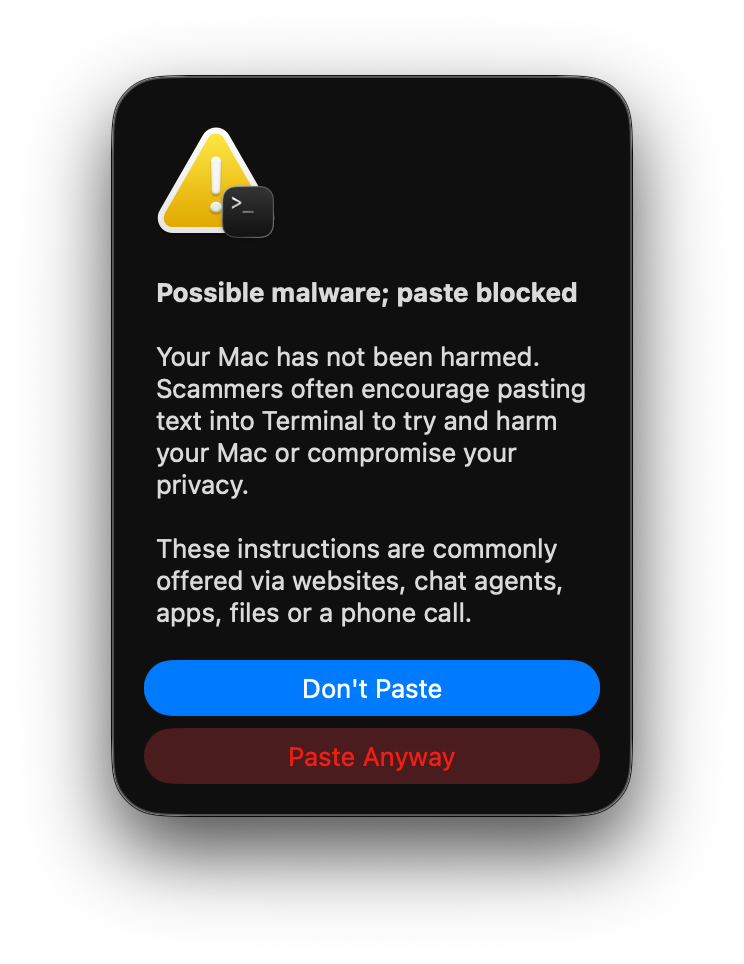
Documented by Ferdous Saljooki, the first is a warning built into Terminal that presents a Possible malware; paste blocked prompt when content is pasted from a browser. As Saljooki’s analysis shows, the warning fires only when multiple conditions are all met, including that the user is not a developer and hasn’t opened Terminal in the last 30 days. This makes it an effective safeguard for general users, but by design it won’t trigger for developer and IT users that regularly use Terminal.
The second layer runs inside the XProtect daemon. Subscribing to undocumented Endpoint Security Framework event types (as detailed by Patrick Wardle), it scans pasted content (exclusively from its own list of browsers) and checks any domains found against Safari’s Safe Browsing Service in real time - blocking the paste with a Malware Detected, Paste Blocked prompt. A more substantive defence that operates regardless of user profile, though limited to domains already present in Apple’s blocklist.
On the open-source front, tools like Patrick’s BlockBlock provide heuristics-based blocking of content pasted into terminal applications.
These are welcome steps in the right direction.
For security teams managing enterprise fleets, though, there are areas where additional coverage and customisation can complement these protections - content-level heuristics that don’t depend on closed domain intelligence, coverage across paste sources and vectors, centralized telemetry, and policy-driven configurability.
Today we’re releasing Clipboard Protection in beta - a new capability in the Phorion agent that detects and blocks ClickFix-style paste attacks in real time.
A unique endpoint perspective
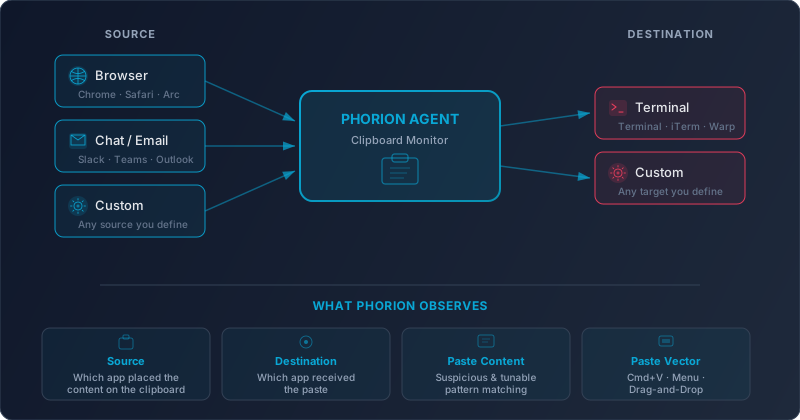
Phorion’s position on the endpoint provides a unique vantage point to build a high-fidelity, highly-configurable, clipboard monitor. At the system level, our agent can observe what no single application can:
- Where the content came from: we track which application placed content on the clipboard, so we know whether it originated from a browser, a chat application, or an internal tool
- Where the content is going: we detect when a paste lands in a terminal emulator; the typical destination for these ClickFix attacks
- What the paste contains - we evaluate the clipboard content against configurable heuristics, only logging and taking action where suspicious patterns are detected
- How the paste happened: whether via keyboard shortcut (⌘+V), right-click or toolbar menus, or even a drag-and-drop, we cover every paste vector
With this full context, we’re not guessing whether a browser-initiated copy ends up in a terminal, or where a terminal paste originally came from.
Protect users, don’t block productivity
Not every paste from a browser to a terminal is malicious. Developers paste legitimate commands from documentation dozens of times a day. For some, blanket blocking would grind work to a halt.
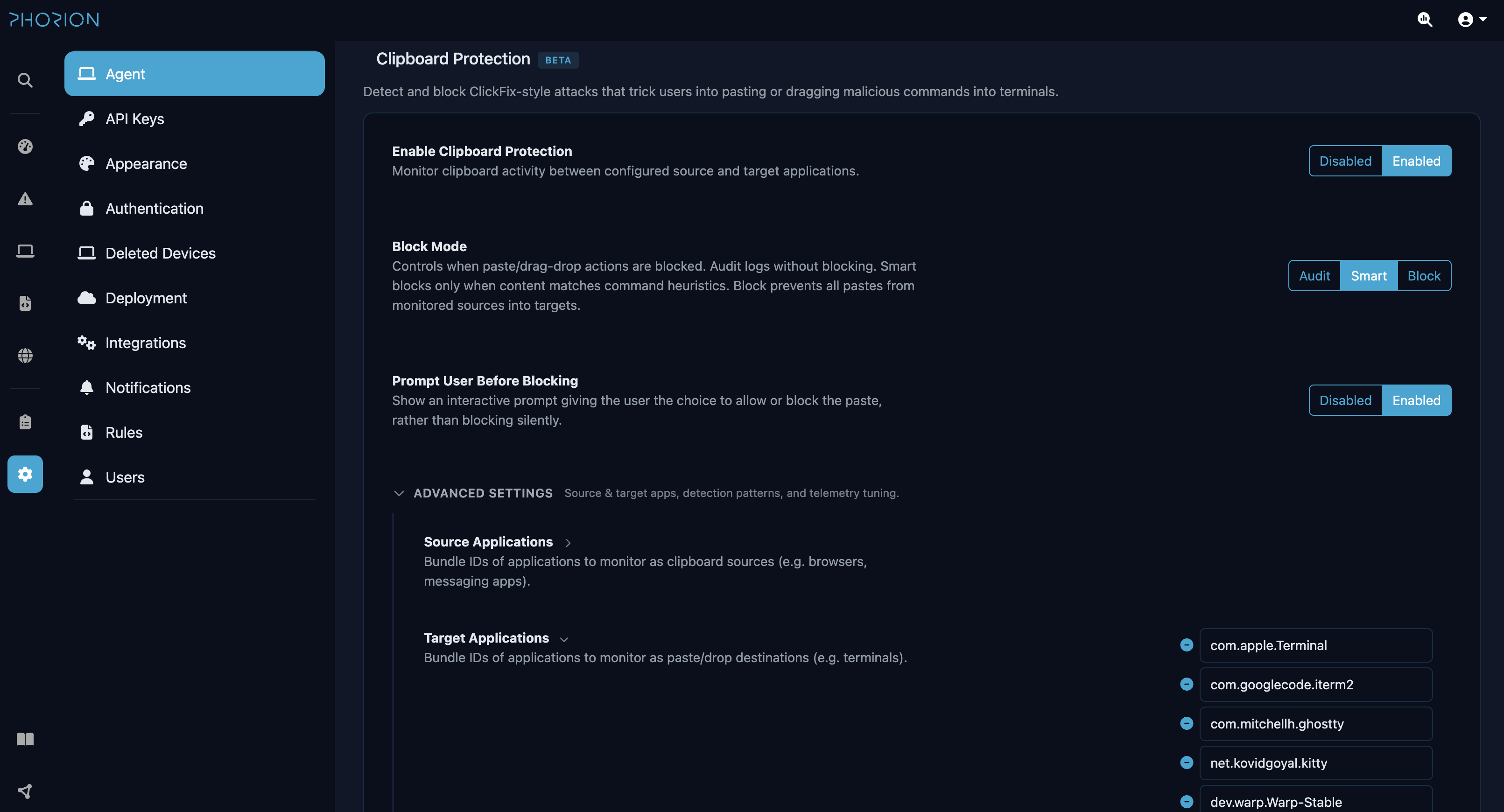
That’s why Clipboard Protection supports three blocking modes, so you can match the level of protection to your organisation’s risk appetite:
| Mode | Behaviour |
|---|---|
| Audit | Evaluate every paste, block nothing. Rich telemetry is emitted for every monitored paste, so you can measure your baseline and understand normal clipboard workflows before enabling enforcement |
| Smart | The sweet spot for most organisations. Only blocks pastes that match dangerous patterns (suspicious curl flags, encoded payloads, command chaining) while letting routine development pastes through without interruption |
| Block | Maximum protection. Blocks all pastes from monitored sources to protected destinations, regardless of content |
Any of these modes can be paired with an interactive prompt. Instead of silently blocking a paste, Phorion presents the user with exactly what’s about to be pasted and where it came from. The user can choose to allow the paste and continue, or cancel it.
A “Remember” option, inspired by Patrick’s BlockBlock implementation (mahalo!), lets them approve a paste and suppress further prompts for that terminal session, keeping friction to a minimum for known-good workflows. If the prompt goes unanswered, it times out and blocks automatically.
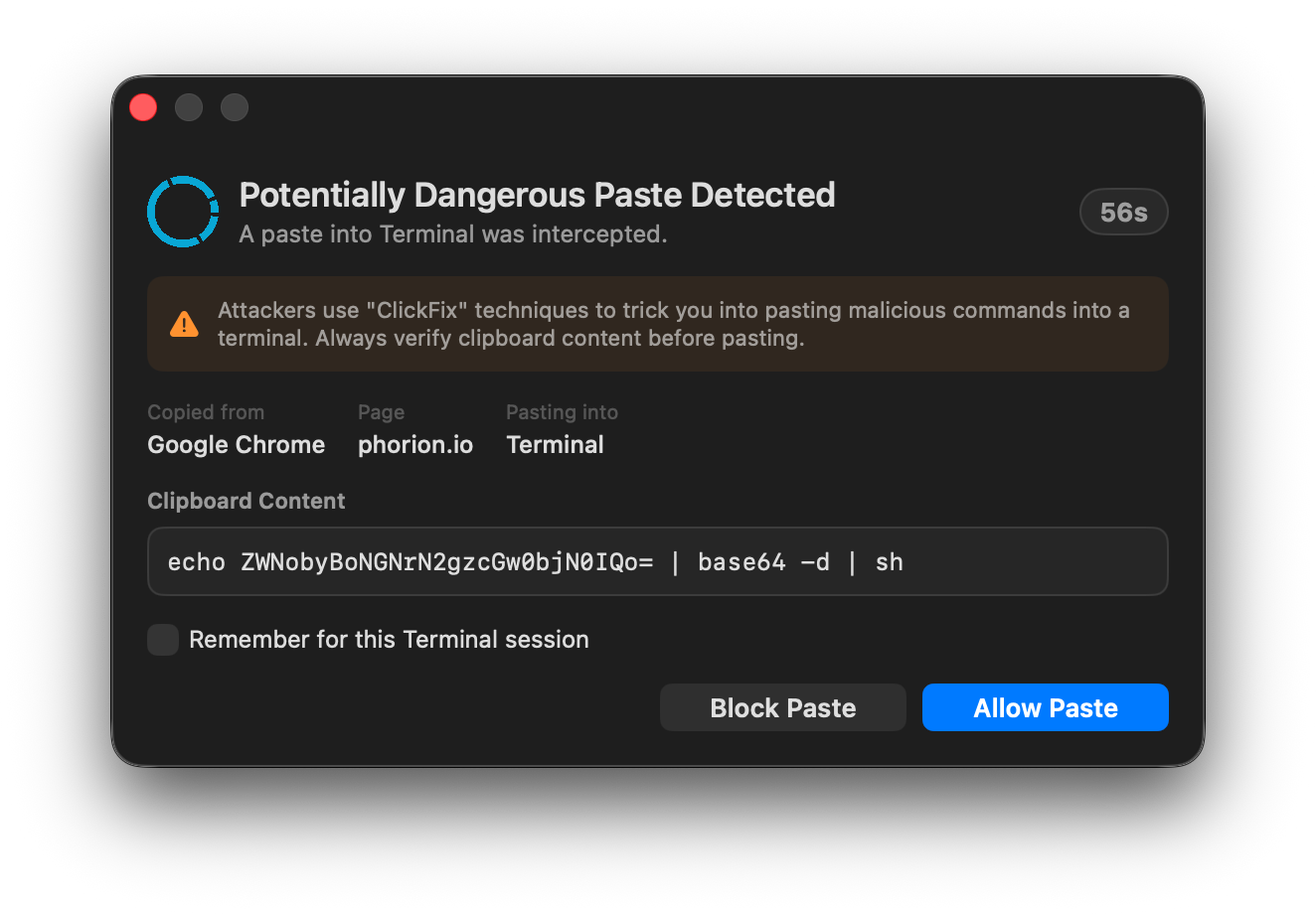
Every decision (whether the paste was blocked silently, blocked by timeout, or explicitly allowed by the user) is logged and available to security teams. This means that even when a user approves a paste, there’s a full audit trail of what was pasted, from where, and in what scenario.
Adapt to Your Environment
Transparency is a core tenet of how we build at Phorion. This isn’t a blackbox of signatures and hardcoded browsers and terminal apps. Every organisation is different, and Clipboard Protection is designed to reflect that.
Phorion gives you full control over what’s monitored, what’s blocked, and what’s excluded.
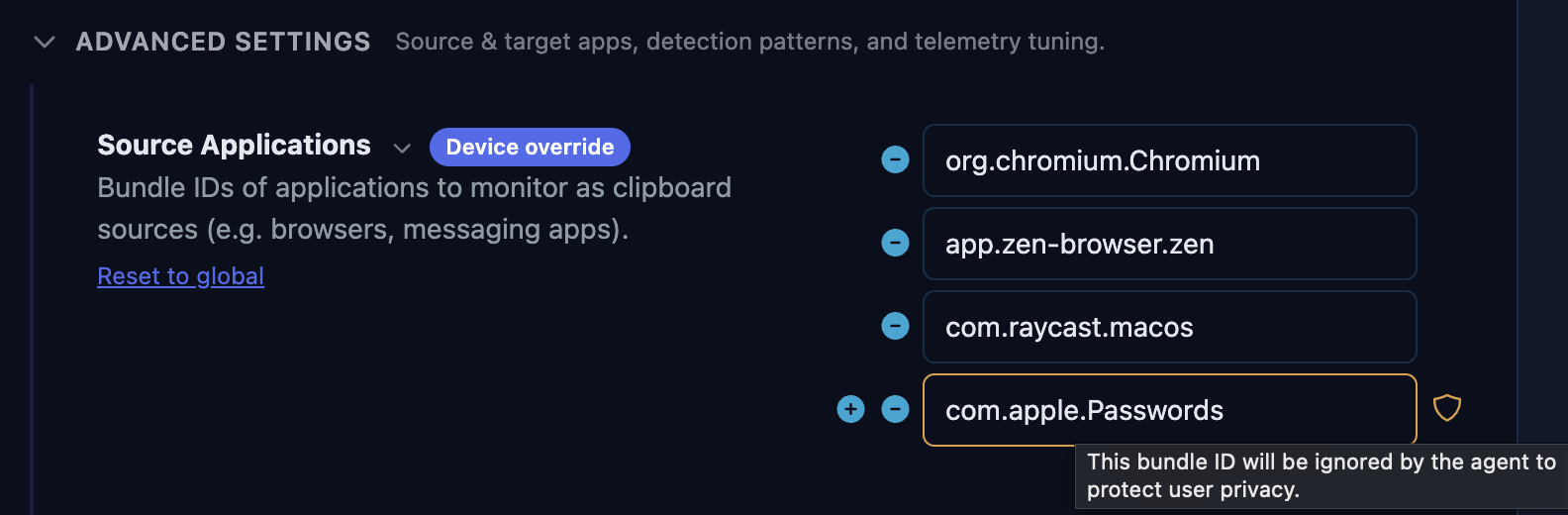
Define the sources. Choose which applications are treated as monitored sources. Browsers are the default (Chrome, Safari, Firefox, Arc, and others), but you can add Slack, Teams, Discord, or any other application that might be used to deliver a ClickFix lure.
Define the destinations. Choose which applications are protected as paste targets. All major terminal emulators are covered by default (Terminal, iTerm, Warp, Ghostty and others), and you can customise the list as needed.
Define what’s suspicious. In Smart mode, configure the heuristics that determine when a paste is dangerous. Out of the box, it catches the patterns most commonly associated with ClickFix attacks, but you can add your own patterns or adjust thresholds to match your environment.
Exclude what you trust. Build exclusions for known-safe content. If your team routinely pastes deployment commands from an internal wiki, or you’re regularly installing dev tools with one-liner installs, exclude those by domain or by content pattern, so your users aren’t interrupted for legitimate work.
Handle clipboard managers gracefully. Tools like Raycast, Alfred, and Maccy are staples of the macOS workflow. When a user pastes something from a clipboard manager’s history, Phorion still traces the content back to its original source. If it was copied from a suspicious website and later replayed via Raycast, we evaluate it accordingly: no gaps, no disruption to the user’s workflow.
A Note on Privacy
Any feature that observes clipboard content carries an inherent responsibility. A clipboard monitor that isn’t carefully designed could in itself become a security concern, whether through misconfiguration by an overzealous admin, or simply through accidental data exposure. We’ve built several safeguards directly into the agent to prevent this.
Privacy blocklist. The Phorion agent ships with a built-in blocklist of privacy-sensitive applications: password managers like 1Password, Bitwarden, Apple’s own Passwords app, and others. This applies to both to the source and destination of the paste event and ensures that these applications are never monitored.
Secret Redaction. Clipboard content pasted into terminals can contain API keys, tokens, and credentials. The same secret-scrubbing regex engine that redacts sensitive values from Phorion’s process telemetry is applied to clipboard snippets before they leave the device.
Configurable snippet length. Administrators can control the length of the clipboard content snippet included in telemetry via the length setting, from a generous window for deeper analysis right down to zero, which disables content capture entirely. Phorion still hashes the clipboard content, allowing security teams to correlate common attack payloads across their fleet without ever seeing the raw text.
Interested in trying it out? Clipboard Protection is available in beta now for all Phorion users. Get in touch to arrange a demo.