TL;DR
Users can now describe what they want in plain language and have an AI agent script and run endpoint automation that would previously have been rare outside technical teams. The resulting behaviour isn’t always predictable or understood by the person requesting it. For security teams, that means substantially more noise to investigate. Working out what’s expected, what needs investigating, and what shouldn’t be allowed gets harder when that behaviour keeps changing.
This post opens our three-part series on endpoint security in the age of AI, exploring what needs to change in how we approach security as AI becomes part of everyday work:
- Mindset: rethinking detection fidelity. This post looks at why familiar detections are getting noisier, why tuning doesn’t carry across the fleet as easily, and why users themselves don’t necessarily know what they’re doing.
- Inventory and detection. Understanding which AI tools are running, what they’re doing, and how to bring that context into detections so analysts aren’t reconstructing every workflow from scratch.
- Enforcement. Using that visibility to set boundaries: hardening endpoints and restricting what agents and the tools they run can access or execute.
We’re not setting out to tell you which AI workflows to allow or which alerts to tune away. This series explores the visibility and controls you need to make informed decisions for your own environment and user base, so you understand what you’re allowing and can enforce the boundaries you choose.
When the outcome doesn’t explain the behaviour
Consider a user asking an AI agent to write a script that retrieves data from a service they use at work. The service supports API authentication, but the agent takes a different route: rather than asking the user to configure API credentials, it writes the script to pull their existing session token from their browser cookies and use that to authenticate.
The script might return exactly the data the user wanted, using an authentication shortcut an experienced developer wouldn’t even consider. If the output looks right, the user may never realise their browser cookies were involved.
- Generate a script
- Read a session token from browser cookies
- Use that token to retrieve the data
Most Endpoint detection and response (EDR) tools can show at least part of the process tree, the commands run, the files accessed; so an analyst can piece together what happened. But beyond that operating system level, understanding the intent and motivation behind these agent actions becomes challenging, as often users themselves don’t know the behaviour an agent just performed on their behalf.
Defining normal
Keeping alert volumes manageable without sacrificing detection coverage usually requires tuning detections to your specific environment and user base. That takes a fair bit of digging into the software people use and the alerts it generates, working out which behaviours are expected and how to exclude benign activity without creating gaps in your detection coverage.
Mac admins will recognise some of the odd behaviour that we’ve seen from enterprise software: applications reading the Transparency, Consent, and Control (TCC) database directly to check permissions, or those that refuse to take “no” for an answer, repeatedly calling tccutil to reset permissions and asking again until the user clicks “Allow”. There was plenty of this to investigate before AI came along.
Working through those quirks was a substantial upfront job, but with the same applications deployed across the fleet, an exception for a reviewed permission check could benefit every device running that version. Once the baseline settled down, more of the effort went into maintenance as applications were introduced, updated, or used differently.
AI agents and rapid local development increase the pace of that work, while simultaneously decreasing its return on investment. Users can build tools for their own tasks and iterate on them in minutes, so new behaviour keeps arriving before the team has finished understanding what was already there.
Much of that tooling is specific to a user or device, and can be disposable: inline commands or temporary scripts generated for a single task. There may be no stable script path, application signing ID, or common behaviour to tune around. Excluding the agent or interpreter would cover far more than the activity that was reviewed, leaving engineers with ongoing tuning work that may not apply to the rest of the fleet, or indeed the same device a day later.
Every laptop starts to look like a developer laptop
Developer laptops have always been among the more entertaining devices to monitor. New dependencies, local servers, and scripts held together just well enough to get something working, all producing legitimate activity that looks odd from the outside. “Everyone is a developer with AI” brings some of that experience to the rest of the fleet. That one, monstrous, perl script masterpiece written by a tenured engineer that once kept a business process ticking over? They’re now cropping up everywhere, and those running the code may not be able to explain it.
Analysts increasingly have to reach out to users to ask what they were trying to do when an alert fired, then work out whether the behaviour makes sense for that task. Those conversations take time, particularly when the user doesn’t recognise what the agent did. As AI adoption spreads, the queue can fill with alerts that each need more back-and-forth to triage. What used to be a noisy group of developer laptops becomes a much wider problem, with more interruptions for users and an increasingly fatigued security team.
Why familiar detections are getting noisier
Chrome’s remote debugging interface is a useful example to look back on. SpecterOps published research showing how it could be used to extract browser cookies, and Chrome launching with --remote-debugging-port was a reasonably high-fidelity signal in our detections.
Chrome has since restricted remote debugging against its default profile, so that particular route to stealing a user’s existing sessions is no longer as straightforward. It’s still a useful example of how legitimate usage can change underneath a detection.
AI agents now regularly use browser debugging to inspect pages and test frontend changes, through tools such as Chrome DevTools MCP. What previously had a relatively small set of legitimate uses to account for can now appear throughout ordinary AI-assisted work.
If a detection only looks at the event that triggered it, the fact that an AI agent initiated the activity may never enter the decision. The analyst is left to trace that back through the process tree after the alert has already fired.
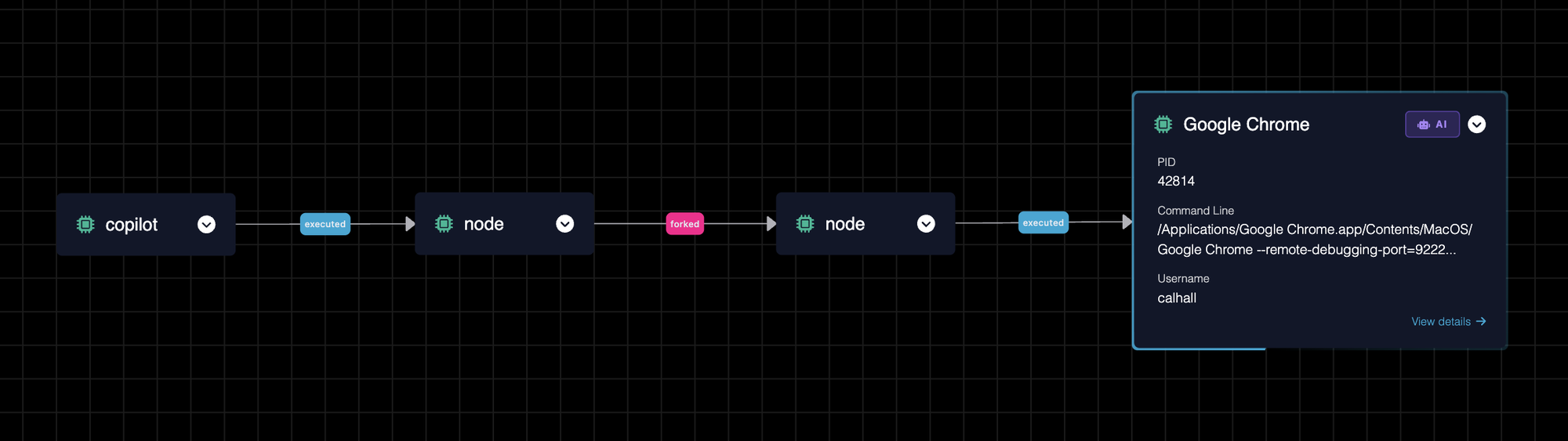
GitHub Copilot launching Chrome with remote debugging enabled during a frontend development task.
Part 2 of this blog series will look at bringing that AI context into the detection itself, rather than leaving analysts to reconstruct it each time. Knowing an agent was involved doesn’t make the activity safe, but it gives teams more to work with than the triggering event alone.
What needs to change
AI-generated tooling is making endpoint behaviour less predictable, familiar detections noisier, and tuning harder to reuse across a fleet. Asking users to explain each alert doesn’t scale, especially when they don’t understand what the agent did either.
Detection needs to account for where activity originated from, and the workflow it belongs to, rather than relying on the triggering event alone. That means better visibility into what AI tools actually do on your endpoints, so you can make informed decisions about which behaviours you’re comfortable allowing.
We’re not suggesting you blindly tune out AI activity, or prescribing which behaviours to accept in your environment. The point is to understand that activity well enough to make those choices deliberately, with controls to enforce them rather than just accepting whatever an agent happens to do.
The next two posts will cover the inventory and detection context needed to make those decisions, followed by the controls to harden your endpoints around them. How much freedom AI tooling gets should be a conscious decision for your organisation, with room for people to build and experiment within those boundaries.