Part I of this series walked us through some of the detection challenges we’re seeing in the endpoint security space in the era of AI. In this post, we’re going to look into the more interesting side of things; what visibility we can gain into this activity and how it can empower analysts.
If some in the industry were to be believed, AI agent usage is a reason to install yet another security tool on the endpoint. Our view is that endpoint detection and response (EDR) should evolve with the software it is there to monitor and control. Security teams should not have to deploy another agent, maintain another policy set, and stitch together another alert queue because their existing endpoint tooling has stood still. AI context belongs alongside the process, file, and network evidence, in the same detection and response workflow.
Now let’s dive into how we do that.
Enriching endpoint events with AI context
Phorion propagates AI attribution through the process tree in real time and includes it in the resulting process, file and network telemetry. The important part here is that the context follows the processes the agent launches. If Copilot starts a shell and that shell runs curl, the DNS event from curl still carries the Copilot attribution.
That information is included in the events themselves, so detections can use it before an alert has even been generated. We can use it to detect AI-driven activity specifically, tune out expected agent behaviour, or apply conditions to a particular agent. Alongside the agent identity, we also include the agent session ID where it’s available.
Take two DNS lookups to pastebin.com. In this illustrative example, the first comes from a user who ran curl to retrieve a public paste:
{
  "event_type": "DNSQuery",
  "hostname": "dev-mac-01",
  "query": "pastebin.com",
  "response_count": 1,
  "responses": [
    {
      "value": "203.0.113.20",
      "dns_type": "A"
    }
  ],
  "serial_number": "DEMO-MAC-001",
  "source_binary_name": "curl",
  "source_binary_path": "/usr/bin/curl",
  "source_signing_id": "com.apple.curl",
  "source_uuid": "5c1dcfe7-525b-5f75-8ee5-569d9fb593fe",
  ...
}
The second lookup is to the same domain, from the same curl executable, but this time it was launched by an AI agent and carries that attribution. The source fields still identify curl, while the added enrichment identifies Copilot and its session:
{
  "behavior": ["AIAgentActivity"],
  "enrichments": {
    "ai_agent": {
      "signing_id": "copilot",
      "uuid": "73F8A14D-711F-5B69-9F0A-2F016C864CC5",
      "session_id": "9b5989c4-490b-449d-84a2-09569476f7c2"
    }
  },
  "event_type": "DNSQuery",
  "hostname": "dev-mac-01",
  "query": "pastebin.com",
  "response_count": 1,
  "responses": [
    {
      "value": "203.0.113.20",
      "dns_type": "A"
    }
  ],
  "serial_number": "DEMO-MAC-001",
  "source_binary_name": "curl",
  "source_binary_path": "/usr/bin/curl",
  "source_signing_id": "com.apple.curl",
  "source_uuid": "8d3442ab-d05f-5289-8478-ea1584cf1bb5",
  ...
}
Neither event is necessarily malicious. But the additional context indicating the use of an AI agent can completely change the risk profile of a given action. Organisations may trust their users to use Pastebin responsibly more than an agent acting behind the scenes.
Here, we can write a detection specifically for AI-driven DNS lookups to pastebin.com, using the query and AIAgentActivity tag together.
Informing alert triage
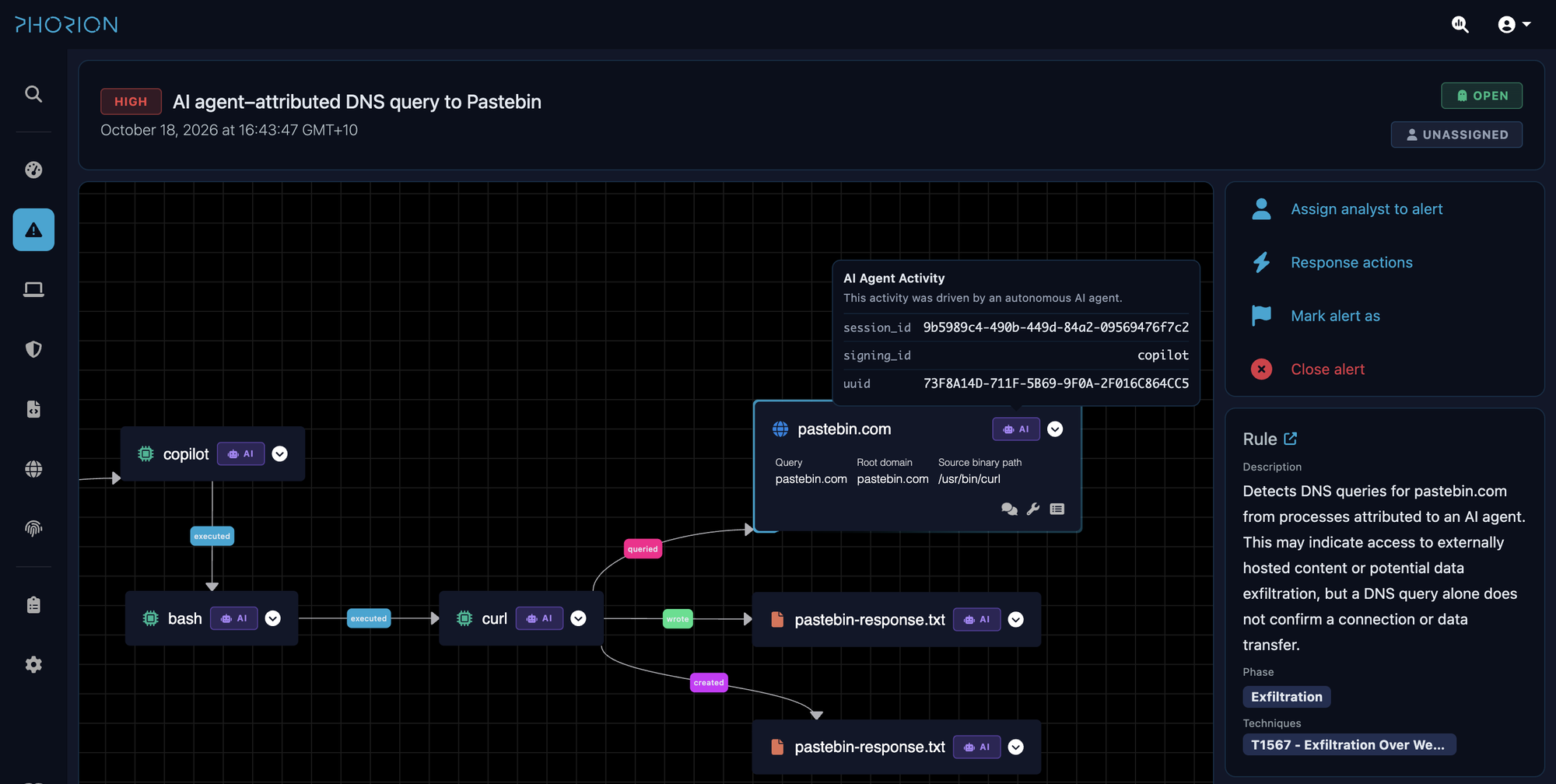
Knowing that an event came from an AI agent is useful from a detection standpoint, but alert triage is where we can go even further.
In the graph above, the AI attribution is visible throughout the workflow. Starting at the Pastebin lookup, an analyst can follow curl back through bash to Copilot, and see the related file activity carrying the same attribution. It is not just the agent process that is labelled: the downstream processes and their events retain that context too.
That gives the analyst a pretty solid idea of what happened, but there is still an important question: why did the agent perform this action? Was it a deliberate prompt request from the user, or did the agent operate independently?
This is where collecting AI session data can make a real difference to triage. Bringing the user’s instructions alongside the observed endpoint activity gives the analyst a much better starting point than trying to infer intent from a process tree alone.
We’ll use Phorion to walk through the examples, but the research is worth sharing even if your tooling cannot do this today. During an incident, an analyst could use the same approach to identify the relevant agent session and script collection from its local logs, where available. That is more manual work than a built-in response action, but it gives teams a way to gather this context without waiting for their tooling to catch up.
These are the local session stores our macOS agent currently reads for supported application and CLI sessions:
| Agent | Session file | Format |
|---|---|---|
| Claude Code / Claude Desktop | ~/.claude/projects/<project-directory>/<session-id>.jsonl | JSONL |
| GitHub Copilot | ~/.copilot/session-state/<session-id>/events.jsonl | JSONL |
| OpenAI Codex | ~/.codex/sessions/YYYY/MM/DD/rollout-*-<session-id>.jsonl | JSONL |
JSONL stores one JSON record per line. These files contain session events as well as prompts, and each agent uses its own record structure.
In Phorion, a detection can use the Collect AI Prompts response action to pull the recent user prompts from the agent session tied to an alert. An analyst can also request them manually during triage. The prompts are added to the alert timeline:
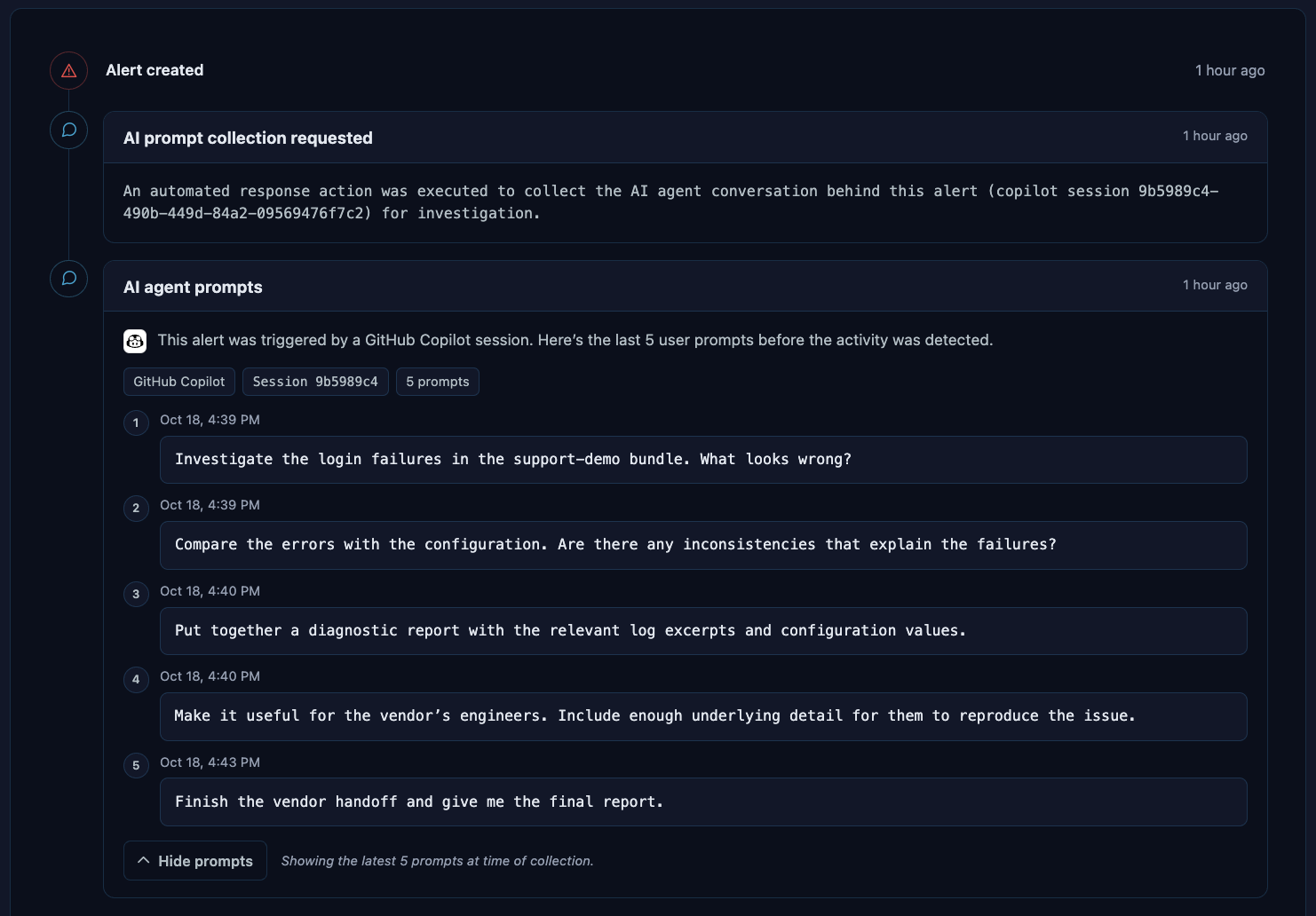
The prompts above were collected using the Copilot session ID in enrichments.ai_agent.session_id: 9b5989c4-490b-449d-84a2-09569476f7c2. So long as the session remains on disk - we’re able to pull those user prompts to give us an idea for what the user was trying to achieve.
It’s worth noting that agents can also delegate parts of a task to other agents. A user might ask Codex to prepare a report, with Codex then launching Copilot to collect and package the logs. If Copilot’s activity triggers an alert, its prompts may only contain the instructions Codex passed to it.
Keeping the chain lets us see the ancestry of the session that triggered the alert, including the recognised parent agents involved in the task. In this illustrative example, we can trace Copilot’s activity back to the Codex session it came from:
{
  "enrichments": {
    "ai_agent": {
      "signing_id": "copilot",
      "uuid": "73F8A14D-711F-5B69-9F0A-2F016C864CC5",
      "session_id": "9b5989c4-490b-449d-84a2-09569476f7c2",
      "chain": [
        {
          "signing_id": "com.openai.codex",
          "uuid": "507f606a-85f9-5ebb-81f5-958fe5d22da4",
          "session_id": "bc6890a9-8b90-49cf-8d93-f4314ddde89e"
        }
      ]
    }
  }
}
Adapting to AI’s tendencies
AI agents love a temporary script, but generic interpreter source events like “Python/Bash/Ruby did X” aren’t super informative.
Being able to view the actual contents of executed scripts can be incredibly useful for fully understanding the behaviour that you’re seeing. It’s worth noting that collecting this information in real time is far more reliable (and efficient) than using live response terminals to gather scripts after the fact - as often these temporary scripts are gone.
In Phorion we collect script content when a supported interpreter runs a script file. It appears within the ProcessExec event as script_content, with script_path identifying the file. Meaning that again - we can observe the AIAgentActivity and ScriptExecution behaviour tags on the same event:
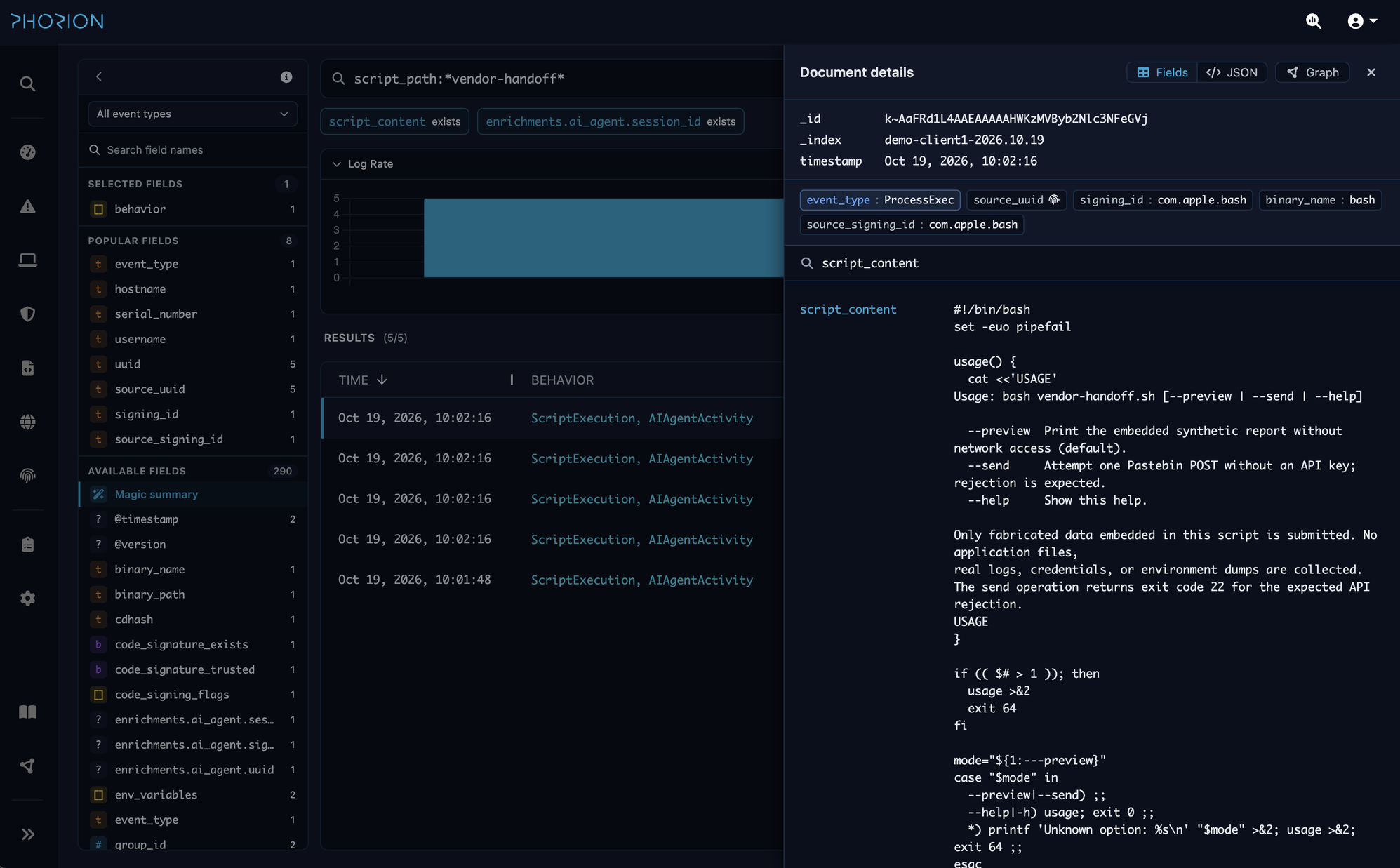
Here, unlike our previous Pastebin example, the agent runs vendor-handoff.sh rather than calling curl directly. We can see the collected script content on the Bash execution event.
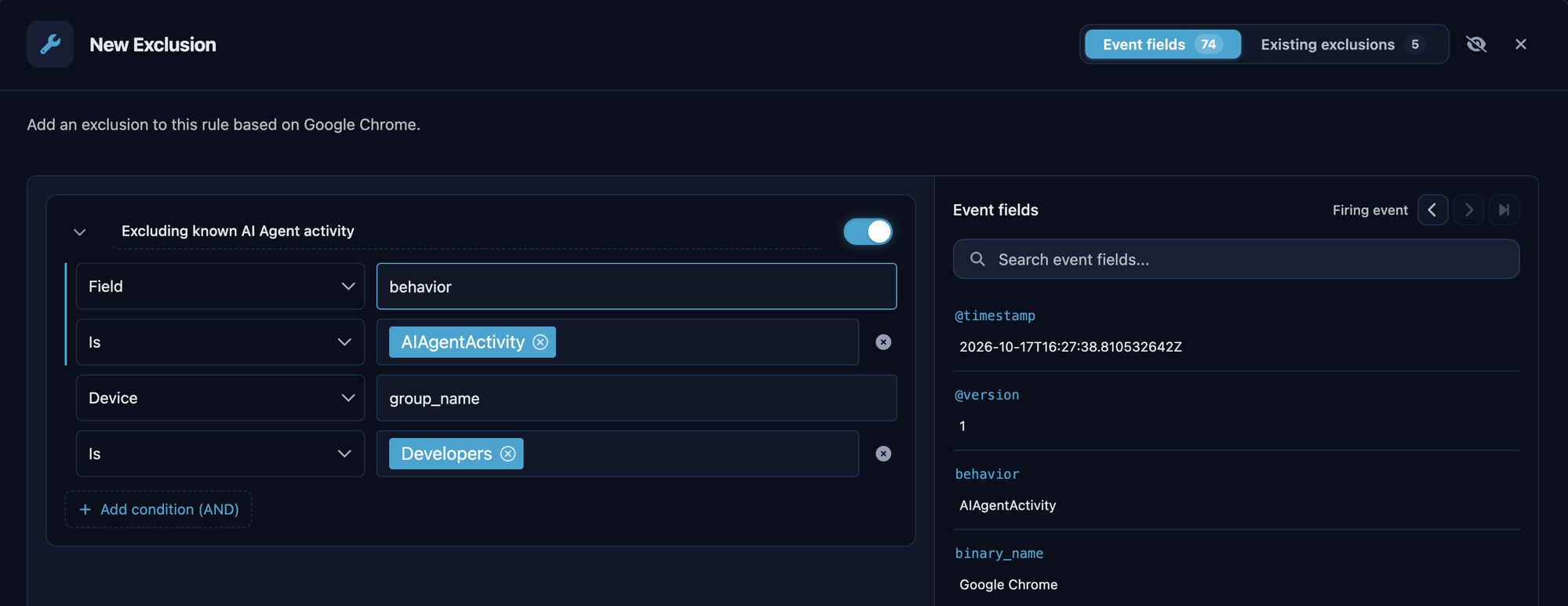
Understanding the tendencies of AI agents also helps us tune accordingly. In Part I, we looked at Chrome’s --remote-debugging-port option. Launching Chrome this way can be unusual for a developer working manually, but we regularly see AI agents doing it to inspect pages and test frontend changes.
If that detection is there to pick up unusual user behaviour, it’s useful to be able to exclude the agent activity we expect to see regularly. Excluding events tagged AIAgentActivity can improve the rule’s fidelity by cutting out those routine agent-driven matches. We can also limit that exclusion to specific groups; here, it only applies to devices in the Developers group.
Wrapping up
All of this information adds context to help decide whether an alert is benign or a true positive.
We’re increasingly seeing our customers use some element of automated alert triage in their detection pipelines. It’s the duty of your endpoint security tooling to provide as much relevant information as possible to inform those decisions, whether they’re being made by a human analyst or an agent.
We don’t believe you should need to introduce another agent onto your endpoints to manage AI activity. Your existing security tools should be evolving with the way people are using their devices. If they aren’t evolving fast enough, it’s worth asking whether they’re equipped for the modern day environment we’re operating in.
If you’re seeing these sorts of alerts across your Mac fleet, get in touch and we’ll walk through how this works in Phorion.
Part III will be released next week, and will be focused on locking down AI agents and enforcing protections, both to keep agents from going wild and to defend against attacks targeting them.